
Getting Started
Equipment – We are using the Oculus Quest 2 available in the USA at Amazon & Best Buy for $299.
Setup – The first time you use the headset you will be guided through registration. You’ll need the Oculus mobile app and a Facebook account.
Experimenting – Share your Oculus account name to make it easy to add each other as friends. You can chat with each other through the Oculus mobile app or directly in your headset.

VR Apps
Some social apps you can experiment with:
- Spatial – Vegar suggested this app and it looks like a great solution. It is free and supports a large number of participants in private rooms. It requires a one-time registration, provides a supporting mobile app, and you can share private links with others.
- Immersed – Roshi mentioned this app. It is free, but requires a paid version to invite others into a private room. There is a free trial period when you first register that lets you test drive the paid options. You can also bring your computer into VR and use extra virtual monitors.
- Wander – Roshi also mentioned this app. It costs $9.99 and allows you to take virtual walks through different places around the world using Google Street Map’s 360 degree photos. You can create a private room and invite friends.
- Horizon Worlds – This is a free metaverse app from Facebook in open beta. You’ll have to register for beta access. You can visit various worlds built by creators, or create your own. The app is still a work in progress, but is probably the closest thing to Second Life in VR. You can visit various worlds publicly or privately and invite friends to join you.
Feel free to experiment with other apps, and please share any suggestions, tips, or questions in the comments below.
Tips & FAQ
VR From Your Couch
Quest requires you to set boundaries for safety. You can set a “room scale” boundary for moving around, or a “stationary” boundary for standing still.
For chatting, and eventually listening to dharma talks in VR it may be more comfortable to be sitting.
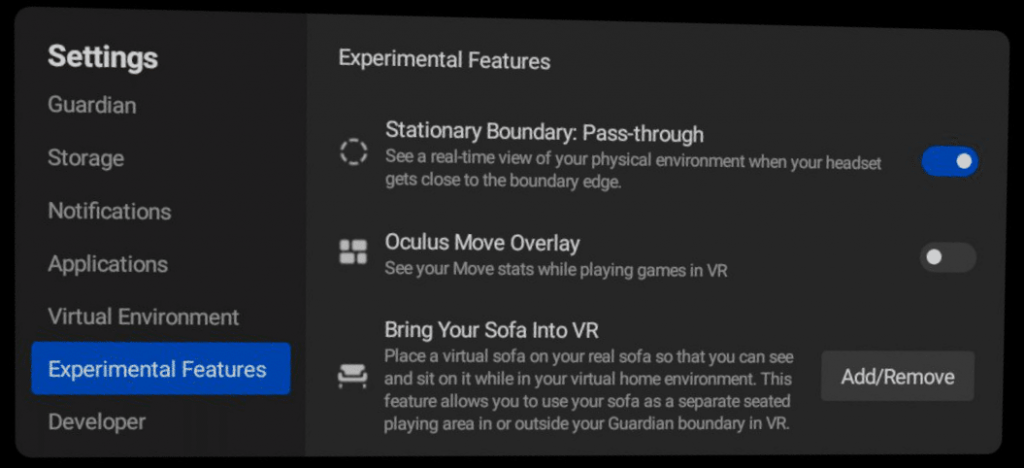
You can define your couch, chair, or bed as a designated boundary through:
Settings > Experimental Features > Bring Your Sofa Into VR.
Do I Need Any Other Equipment Besides The Headset?
The headset works standalone without any additional equipment.
You can use a cable or connect your headset wirelessly to a gaming computer if you want to explore other VR options, but the group will be only be using the Quest’s built-in features.
Do I Really Need To Use Facebook?
Oculus requires an active Facebook account to use the VR system.
You can set a pseudonymous username and adjust your privacy settings to somewhat separate your Oculus & Facebook activities.
test
test again